Week 2
Week 1 Important Points
Element syntax
Remember elements are what we call HTML tags:
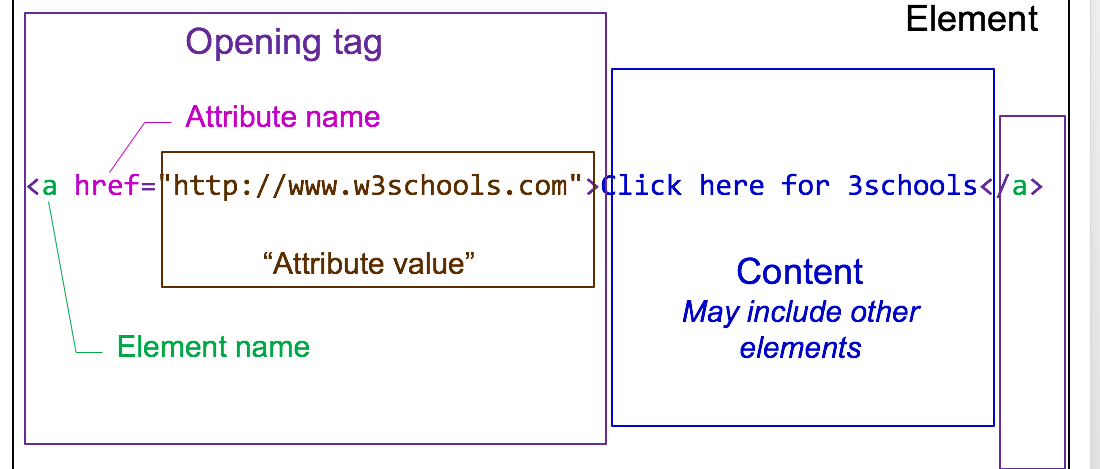
- Basic building block of an HTML document
- container for content
- each type of element may contain certain other elements
- each type of element may have certain attributes
- some elements do not need closing tag (“void” elements) e.g.
<img>
HTML Headings
- Six levels of headings, elements h1 to h6
    <h1>This is biggest heading</h1>
    <h2>This is smaller heading</h2>
How do we validate HTML?
- W3C offers a online validation service
- It's very important you write valid HTML
Introducing the HTML5 Template
- It's often useful to create a starting HTML template. Here's what mine looks like (feel free to use it):
<!doctype html>
<html lang="en">
<head>
  <!-- ensures the document is using the correct char set -->
  <meta charset="utf-8">
  <meta name="description" content="a quick description of the page goes here">

  <title>Insert a meaningful title here</title>
  <link rel="stylesheet" href="css/styles.css?v=1.0">
</head>

<body>


  <!-- These are block level elments, using them creates a new line
      takes up the whole space available
  !-->


  <h1>I am a h1</h1>
  <p> I am a paragraph, I start a new line and take up full width available to me </p>

</body>
</html>
Some New Tags
You'll notice that my template has some tags that you're perhaps not familiar with:
<meta>tags allow us to add further descriptive information about our page are always placed in the<head>section of the page.<link rel="stylesheet" href="css/styles.css?v=1.0">this pulls in a style sheet. We'll look more into this next week
Nested HTML Elements
HTML Lists
- Introducing the unordered list element
- Used for lists (obviously) and for navigation links
<ul>
    <li>List item one</li>
    <li>List item two</li>
    <li>List item three</li>
</ul>
Browser output
- List item one
- List item two
- List item three
HTML Tables
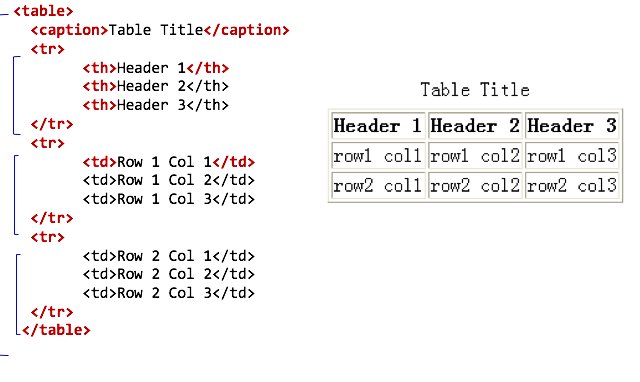
- The
<table>tag encompasses the whole table - It contains rows, each one is a
<tr>element - Each row may contain a mixture of heading and data cells which are defined by the
<th>and<td>tags - Optionally you may also add a
<caption>to your table
Table Attributes
- The
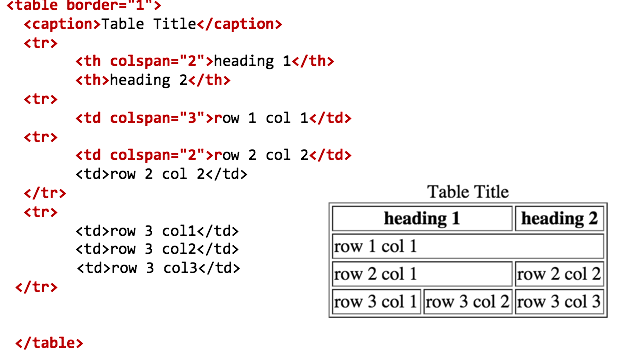
<table>,<td>and<th>tag elements can also contain attributes to modify the look and feel of the table. <table border= "1">this can be used until we introduce CSS<th colspan="2">,<td colspan="2">defines the number of columns a cell should span
Attributes Example