javaScript Image Roll Overs
Having an image change colour or appearance when a user hovers over it can be a useful effect in web design. It's a way to reinforce the user's recognition that certain page elements are alive and clickable. Let's consider how we might achieve this effect using javaScript:
...

<body onload="main()">

    <img id="oceanImage" src="img/ocean_grey.jpg">

</body>

...
//global var
var image;
//main function runs on page load
function main(){
    //get  a reference to the image, notice how we don't use var
    image = document.getElementById("oceanImage");
    //add event listeners to the image
    image.addEventListener("mouseover", mouseOver);
    image.addEventListener("mouseout", mouseOut);
}

function mouseOver() {
    //update image src attribute
    image.src = "img/ocean.jpeg";
}


function mouseOut() {
   //update image src attribute
  image.src = "img/ocean_grey.jpg";
}
The Effect On Mouse Over
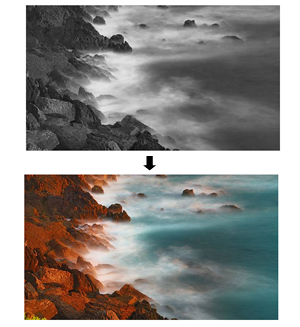
mouseOver and mouseOut events
- In order to achieve the above effect we've used two new event listeners,
mouseoverand mouseout`. - The
mouseoverevent fires when the cursor is over the image. - The
mouseoutevent fires when the mouse leaves the image.image.srcproperty - We can then react to these events and update the
srcattribute usingimage.src = "new image location";