How to Access Related HTML Elements
Consider the segment of HTML below, which represents our blender in the Stores exercise:
<label>Add to cart</label><input data-price="25" type="checkbox" name="product" value="blender">
<input type="number"  value="1" name="blender-quantity">
<p>Total: <span  id="blender-total"> £0 </span>
HTML
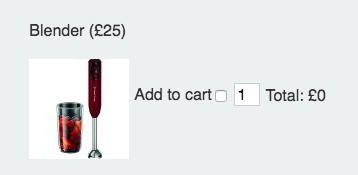
Browser View
In the above example we need to write some javaScript that forfills the following functionality:
- User selects add to cart
- A total is calculated by multiplying the price by the quantity
You've already seen how to loop through a set of checkboxes, and if that checkbox is checked you've seen how to access it's data attribute and value.
But how do we update related checkbox values? Let's have a look at how we might do this for our blender which is item 1 in our checkbox group:
   ....

    var item = form.product[1].value;
    var quantity = parseInt(form[item + "-quantity"].value)
    var checkBoxValue = form.product[1].value;
    var itemTotal = quantity * price;
    //update subtotal
    subTotal = subTotal +  itemTotal;
    //update html
    document.getElementById(item + "-total").innerHTML = "£" + itemTotal;

    ....
Hopefully you can see that we're taking advantage of consistent naming conventions. Let's break down what's happening here:
var item = form.product[1].value; item will hold the value of our product checkbox in this case blender
We can now take advantage of the fact that <input type="number" value="1" name="blender-quantity"> has the name {{item}}-quantity. There's a alternative way of accessing forms that we can take advantage of here, form[feild_name].
This is useful as we could reference our blender quantity form field like this:
var quantity = parseInt(form[item + "-quantity"].value)
We can use similar string concatenation method to set the innerHTML property of the total:
document.getElementById(item + "-total").innerHTML = "£" + itemTotal;
Again, a consistent naming convention has been used here.